
Get Commercial News and Tips Delivered to Your Inbox
Subscribe to the Texas REALTORS® Commercial Update email newsletter by sending a message to email@texasrealtors.com (please specify “Subscribe me to Commercial Update”). You’ll receive monthly newsletters with the latest commercial trends, updates to laws and regulations you need to know, marketing ideas, business tips, and more.
Navigating the complexities of commercial real estate requires more than just experience. To serve your clients at the highest professional level, you need to provide insights backed by reliable data. Did you know you already have access to commercial market data as part of your Texas REALTORS® member benefits?
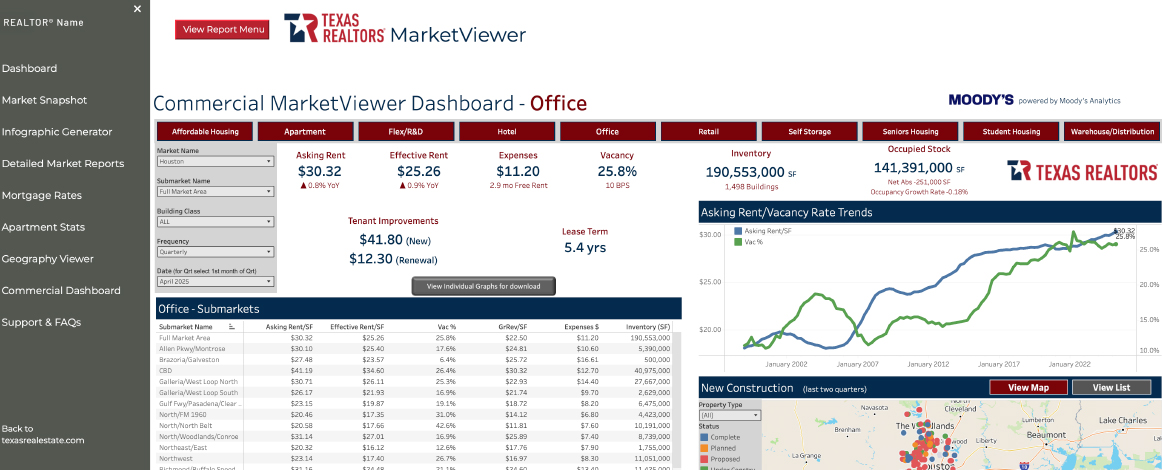
Developed exclusively for Texas REALTORS®, Commercial MarketViewer is an intuitive, interactive tool that gives you fast access to current commercial market data across all Texas metropolitan areas. Whether you’re working with office, industrial, retail, or multifamily properties, this platform provides you with a powerful snapshot of local market conditions and economic indicators.
How You Can Use MarketViewer in Your Commercial Business
- Get current data and trends for leasing activity, vacancy rates, rent, construction pipeline data, and more.
- Export professional charts and summaries for investor briefings, marketing packages, or listing appointments.
- Skip the hours of data hunting. MarketViewer aggregates essential information, so you can focus on client strategy and deal-making.
Want More Help Using Marketviewer?
Texas REALTORS® hosts free Commercial MarketViewer webinars from October 2025 to February 2026—an excellent opportunity to sharpen your market knowledge and explore use cases in real time. Scan the QR code or visit texasrealestate.com/events to attend.

Did You Know?
The New Construction chart gives you the option to explore activity by map or list view. You also can filter by property type (Office, Mixed Use, Financial, Live Work, Medical/Dental) for a customized look at development trends and individual properties.
How to Access the Texas REALTORS® Commercial MarketViewer Dashboard
- Visit texasrealestate.com/marketviewer
- Click the red View Report Menu button
- Select Commercial Dashboard
Example: Market Overview for Office Sector in a Submarket in Houston
Create a PDF snapshot of current leasing and vacancy trends
- At the top of the dashboard, select Office as your sector.
- In the filters on the left, choose Houston, then select your desired Submarket Name, Building Class, and Frequency.
- Click the download icon at the bottom-right to select Image, PDF, or PowerPoint.
You can also hover over key metrics like Vacancy Rate or Occupied Stock to view detailed graphs of trends over time.
Click the gray View Individual Graphs button to get all available charts of key metrics on one screen. To download an image, PDF, or PowerPoint, find the download icon at the bottom-right corner of the page.